

← Back to FAQ
BUDS 3
BUDS 3 FAQ
Answers to common questions about BUDS 3 installation, license generation, activation, launch issues and BRP diagnostics.
How do I buy a license for BUDS 3?
Which adapter is required for BUDS 3?
To use BUDS 3, you need one of the following adapters:
- Kvaser U100
- Chinese clone of Kvaser Leaf Light HS v2
How do I configure Kvaser Leaf Light HS v2?
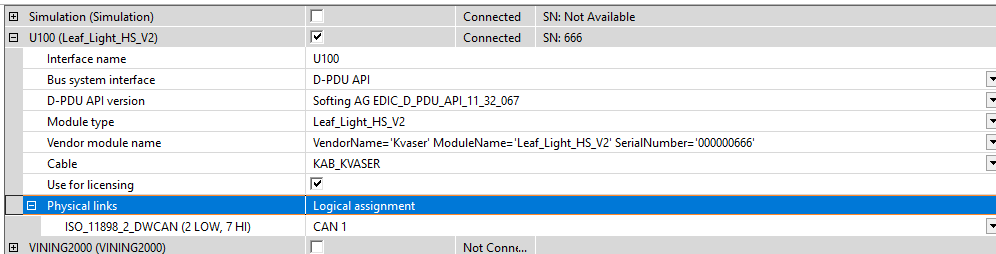
Unlike the Kvaser U100, the Kvaser Leaf Light HS v2 must be configured manually so that BUDS 3 can detect the adapter.
- Connect the adapter to the PC
- Open SystemConfigurator.exe located at
C:\Program Files\BRP\BUDS3\bin - Open Interfaces and expand the U100 section
- Select Leaf_Light_HS_V2 in Module type
- Select the only available entry in Vendor module name
- Select KAB_KVASER in Cable
- Enable the checkbox
- Select CAN1 in Physical links
- Save the configuration by clicking the floppy disk icon
BUDS 3 manual
The PDF installation guide is available below:
Which vehicles are supported by BUDS 3?
BUDS 3 is used for the modern BRP vehicle lineup: Can-Am, Sea-Doo, Ski-Doo and Lynx from 2016 and newer.
Where can I download BUDS 3?
The latest version of the program and the license generation utility are available on the software page.
What are the system requirements for BUDS 3?
For stable operation of BUDS 3, the following specifications are recommended:
- Processor type
- 64 bits
- Quad-core minimum
- Operating system
- Windows 10
- Windows 11
- RAM
- Recommended: 8 GB
- Minimum: 4 GB
- Available disk space
- Recommended: 35 GB SSD
- Minimum: 35 GB HDD
- Screen
- Recommended: 1920 x 1080 (Scale 100%)
- Minimum: 1366 x 768 (Scale 100%)
Why does BUDS 3 not detect BRP vehicles?
Check the drivers, diagnostic adapter, connection cable, and compatibility of the selected software version.
Can I use BUDS 3 for older models?
Not always. For some previous-generation vehicles, BUDS 2 is the better choice.
Which license do I need for BUDS 3?
The choice depends on your tasks. One type of license is suitable for basic diagnostics, while another is intended for advanced functions.
Can I get a short-term license?
Yes, short-term options are available, from a few days to long-term licenses.